Control Google Sign-In on Client Portal Pages
SMBcrm now gives admins control over whether the “Sign in with Google” option appears on Client Portal sign-up and login pages.
What changed
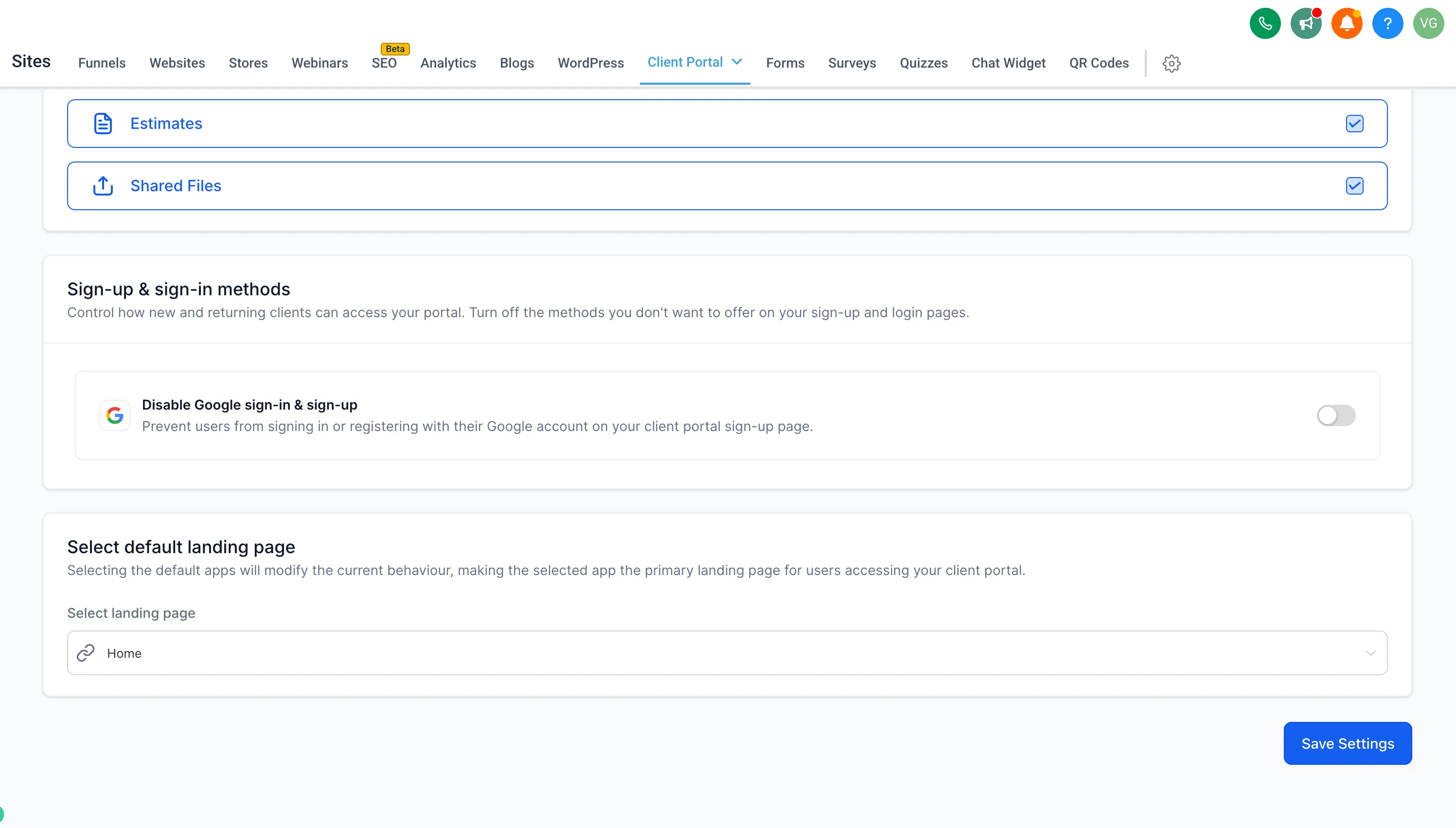
Admins can show or hide the Google Sign-In button from Client Portal app permissions. This helps businesses align portal access with their own privacy, compliance, and data-handling requirements, including GDPR-related considerations.
How it works
In the account, go to Sites > Client Portal settings, open App Permissions, and find Sign-up & sign-in methods. Turn Disable Google sign-in & sign-up on or off, then save the settings.
What contacts see
When Google Sign-In is disabled, contacts can sign up or log in with email and password, or log in using a secure code.
This setting is configured per account and is available on the Client Portal Web platform.
In Case You Missed It
For another Client Portal update, read Client Portal File Uploads Can Trigger Workflows.
Need Help Applying This Update?
Want help turning this update into a working part of your CRM, marketing, or automation setup?
Get Started or schedule a demo and we’ll help you map the right next step.