Custom Expiration Settings for Certificates
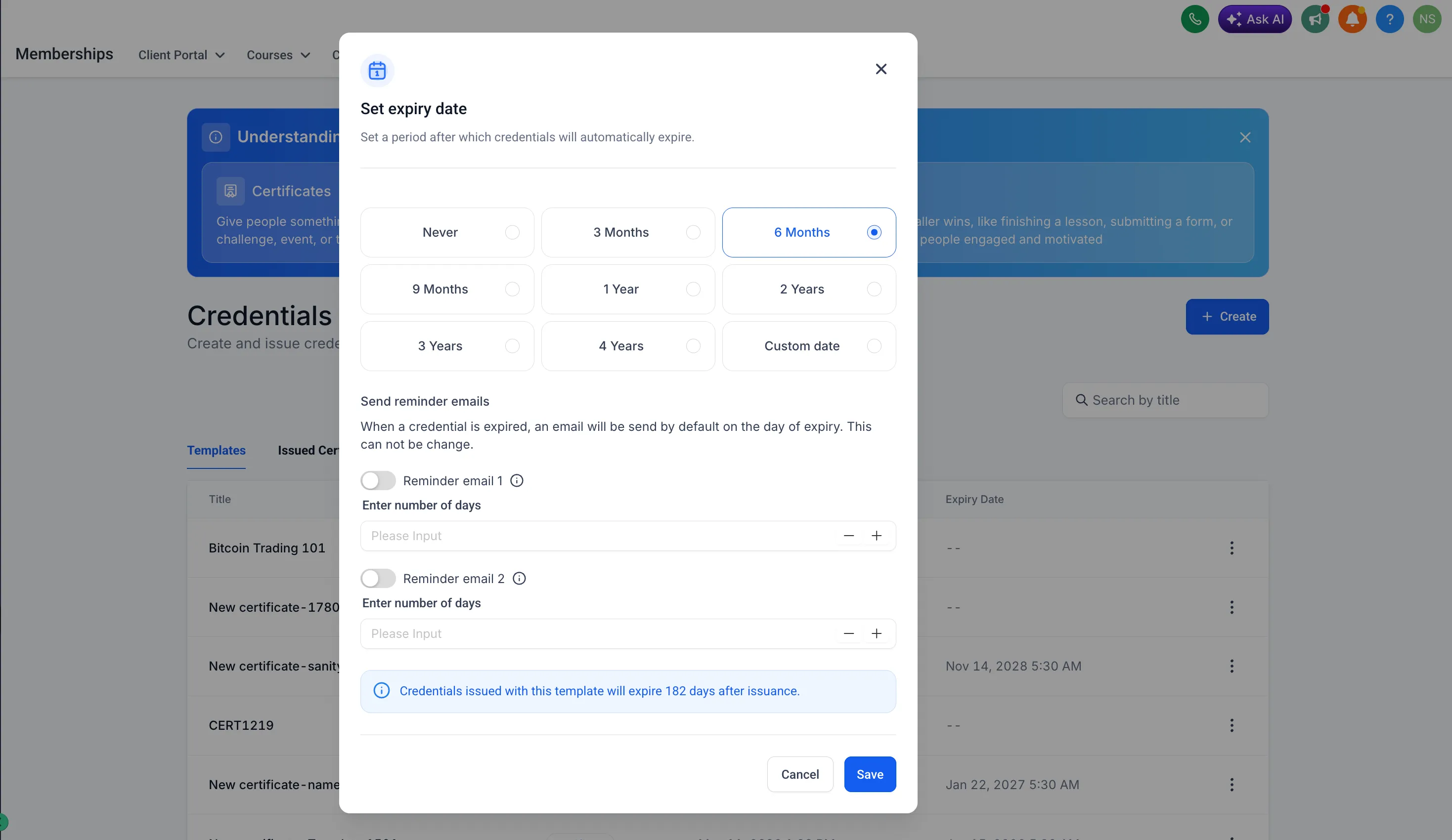
SMBcrm now supports custom expiration rules for certificates and credential templates in Memberships & Education. Creators can decide how long newly issued credentials remain valid and set reminders before they expire.
What Changed
You can configure certificate and credential template expiration in three ways:
- Never expire
- Expire on a fixed date
- Expire a relative number of months after issue
Relative expiration options include 3, 6, 9, 12, 24, and 36 months.
Expiration Reminders
Reminder offsets can be configured so recipients are notified before a credential expires. Expiry calculations and reminder scheduling are timezone-aware.
Where Settings Appear
Expiration settings are shown in credential and template lists and modals, making it easier to confirm the rule applied before issuing credentials.
Getting Started
Open a certificate or credential template, choose an expiration option, and optionally configure reminder offsets. Newly issued credentials will calculate and store expiry based on those settings.
In Case You Missed It
For another recent update, see More Marketing Templates Added to SMBcrm.
Need Help Applying This Update?
Want help turning this update into a working part of your CRM, marketing, or automation setup?
Get Started or schedule a demo and we’ll help you map the right next step.