Media Storage Is Now Available in Workflow Attachments
You can now attach files from Media Storage directly in supported workflow actions. This reduces repeat uploads and makes it easier to reuse approved assets across your automation workflows.
What Changed
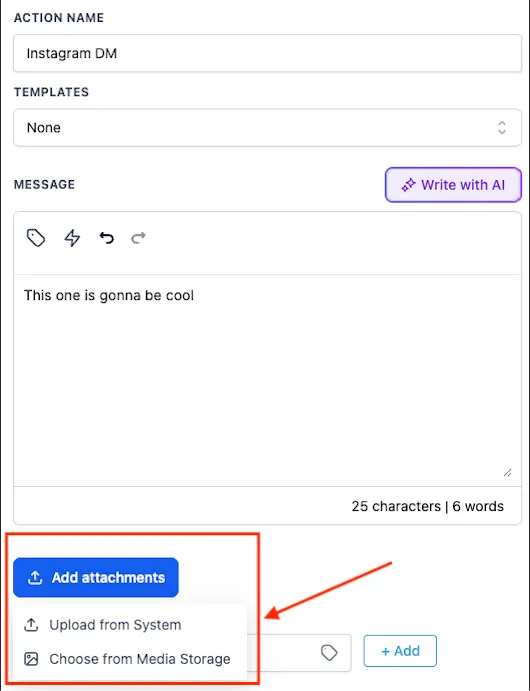
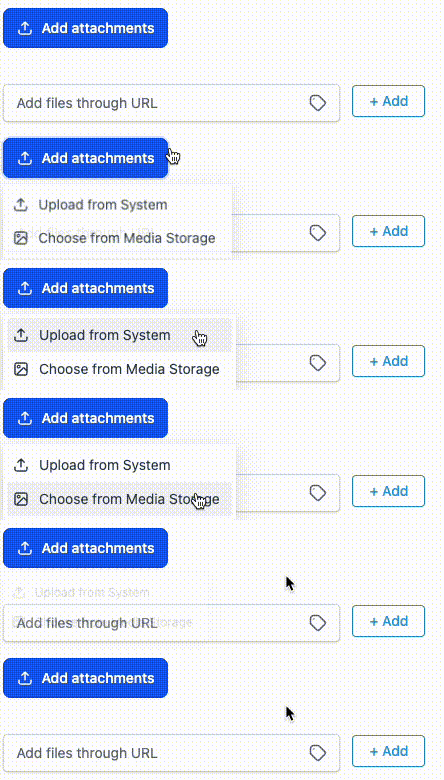
When you click Add Attachment in a supported workflow action, you now get two options:
- Upload a file
- Choose from Media Storage
After you select a file, SMBcrm checks the file type and size using the same validation rules already used for that action. If the file passes validation, it is attached to the workflow step.
If you copy the action, the attached media carries over as well.
Supported Use
This is available in supported workflow actions that allow media attachments, including SMS/MMS, voicemail, chat, and other supported steps.
At launch, Email actions are not supported.
Why It Matters
Before this update, users often had to manage files outside the platform, upload the same asset repeatedly, or paste media URLs into each workflow action by hand.
With Media Storage available inside workflow attachments, you can reuse existing files more quickly and keep your workflow setup more consistent.
What to Expect
- File type and size validation still applies based on the action
- Validation behavior remains unchanged
- Unsupported file types or oversized files show an inline error and cannot be inserted
- Copied workflow actions retain their attached media
- Existing workflows with previously uploaded media continue to work as expected
In Case You Missed It
You can also read about setting a default path for workflow branches.
Need Help Applying This Update?
If you’d like help rolling this out in SMBcrm, visit Support or request a demo.