Opportunities Moved to a Dedicated Tab on the Contact Page
SMBcrm has updated the contact page so opportunities are easier to access and easier to spot during daily CRM work.
What Changed
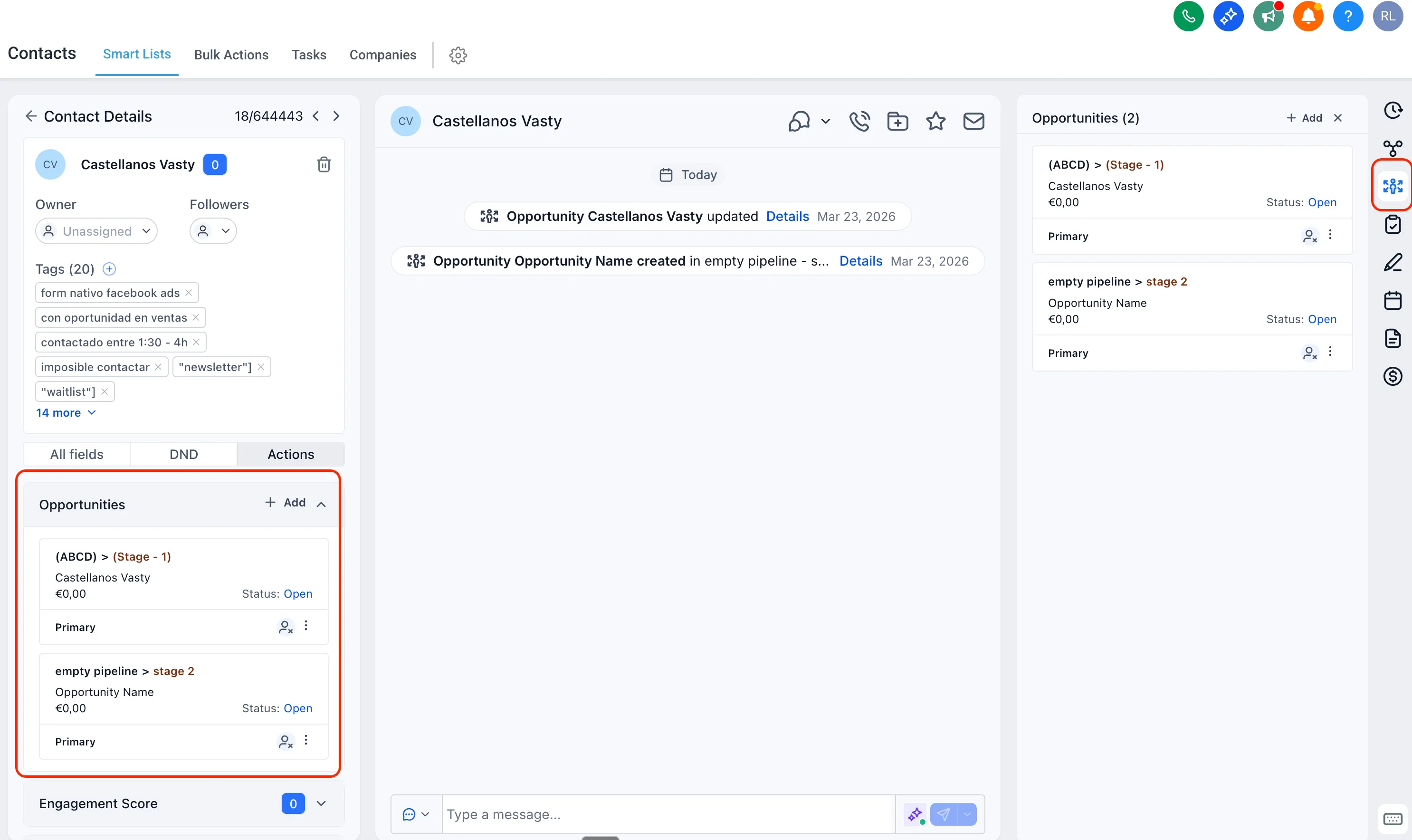
Opportunities now appear as a dedicated tab in the right panel of a contact record, below Associations. This is a layout update designed to improve visibility and make opportunity access more intuitive.
This change does not affect opportunity data or functionality. It only changes where opportunities are shown on the contact page.
You can learn more about SMBcrm’s CRM and sales tools if you want a broader look at how opportunities fit into your workflow.
How It Works
When you open a contact record, you will now see an Opportunities tab in the right-hand panel.
- The tab appears below Associations
- It shows all opportunities linked to that contact
- Opportunities are still available in the Actions menu during the transition period
Transition Period
Until Apr 08, 2026, opportunities will be available in two places:
- the right panel on the contact page
- the Actions menu
After that, opportunities will be removed from the Actions menu and will live only in the right panel.
What’s Next
SMBcrm is also working on contact page customization. According to the release, admins will be able to reposition the Opportunities tab and customize the contact layout based on their preferences.
In Case You Missed It
You can also read about Sort Opportunities by Custom Fields for another update related to opportunity management.
Need Help Applying This Update?
If you’d like help rolling this out in SMBcrm, visit Support or request a demo.